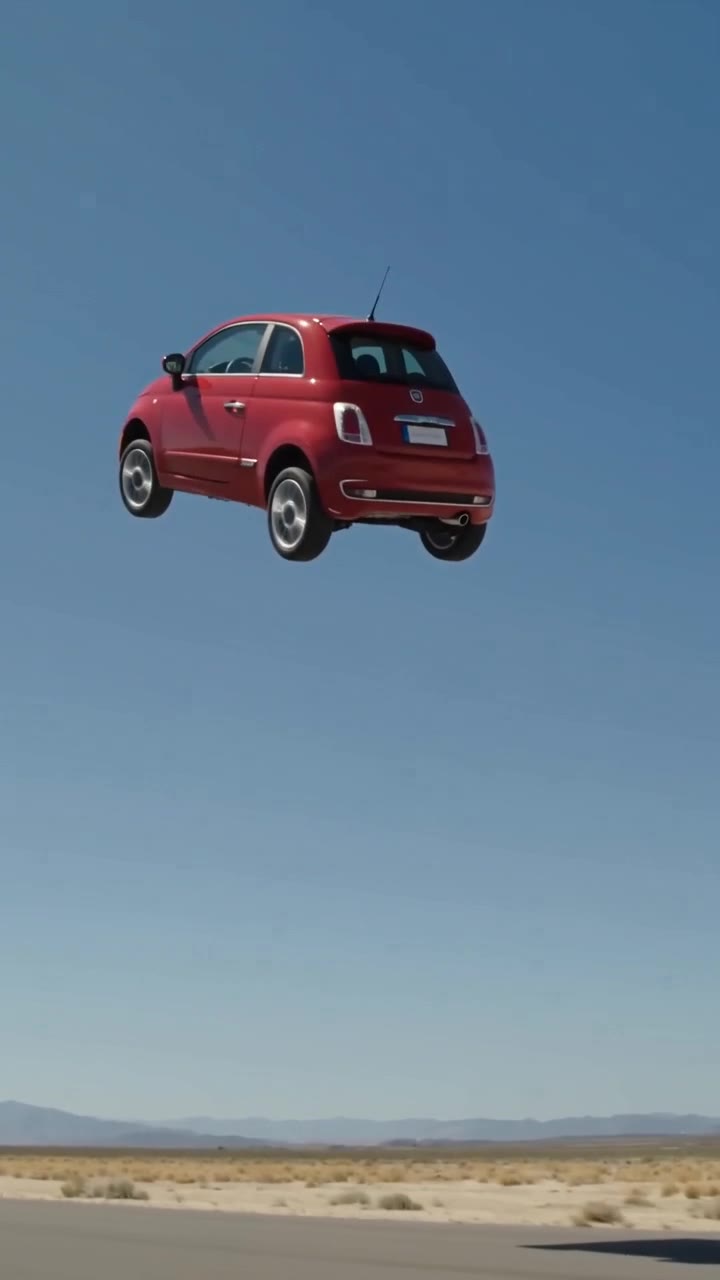
Ramp kickflip AI video (HD sample): A red city car from one parked photo launches off a desert ramp, does a full mid-air roll and lands on all four wheels. HD 720p, 10 seconds, with AI sound.Ramp jump over cars AI video (HD sample): The same red city car flies over a row of parked cars on an airfield runway at golden hour and lands on a ramp. HD 720p, 10 seconds, with AI sound.Fly out of traffic AI video (HD sample): Stuck in a sunset traffic jam, the red city car lifts off on white thruster vapor and flies over the gridlock toward the skyline. HD 720p, 10 seconds, with AI sound.Ramp kickflip AI video (Fast draft sample): Fast draft of the ramp kickflip from the same photo: 480p, 10 seconds, with AI sound, for 1 credit.Ramp jump over cars AI video (Fast draft sample): Fast draft of the ramp jump over parked cars from the same photo: 480p, 10 seconds, with AI sound, for 1 credit.Fly out of traffic AI video (Fast draft sample): Fast draft of the traffic escape from the same photo: 480p, 10 seconds, with AI sound, for 1 credit.
The short answer
A useful flying car AI video prompt defines the vehicle identity, one stunt, camera motion and a clear ending. The ten examples below are for custom-prompt tools; FlyCar AI supplies its own template instructions. Upload one photo of your own car, truck, SUV, van or motorcycle and pick a stunt. The result is a 10-second AI video with generated sound effects, no watermark, and 9:16 or 16:9 framing. HD is 720p for 3 credits; a 480p Fast draft costs 1 credit. Rendering usually takes 3–6 minutes. Buy 3 credits for $6.99 or 9 for $14.99 through PayPal, with no subscription and no credit expiry. Failed or safety-blocked renders automatically release reserved credits. Successful renders do not include a free re-roll. An account is required; there is no free preview. Video uploads, longer clips, 1080p and people or pets in the driver seat are not supported.
How to make a flying car video: three steps
Prepare one daylight photo showing your whole vehicle and sign in.
Pick Ramp Kickflip, Ramp Jump Over Cars or Fly Out of Traffic, choose HD or Fast draft and 9:16 or 16:9.
Submit, wait about 3–6 minutes, then review and download from My Videos. Label it as AI-generated when sharing.
Build a prompt around one readable action
Start with what must stay the same: the vehicle shape, paint and wheels. Then describe an approach, one stunt and an exit or landing. A long list of conflicting moves makes it harder for a model to maintain a coherent scene.
Ask for a continuous shot and a clear camera position. Prompts are instructions, not guarantees: model support for length, audio and reference photos varies. These examples do not promise identical results across services.
What you get with the templates
Kickflip: approach, launch, one roll, landing. Ramp jump: runway acceleration, flight over parked cars, touchdown on the second ramp. Traffic escape: gridlock, vertical lift, forward flight, skyline exit. Each template includes generated sound effects.
Copyable prompt library
For tools that accept custom prompts. FlyCar AI uses three fixed templates; these examples do not add extra modes to our generator.
Desert kickflip
Use the attached vehicle photo as the identity reference. Keep its body shape, paint colour and wheels. The vehicle accelerates toward a steel ramp on a sunny desert track, launches, rolls once around its long axis and lands on all four wheels. One continuous 10-second shot, realistic lighting, generated engine and wind effects, no speech. Remove badges and blank the plate where possible. No people, collisions or deceptive branding.
Tip: Use a side tracking view so the rotation stays legible.
Golden-hour ramp jump
Use the attached vehicle photo as the identity reference. Keep its body shape, paint colour and wheels. The vehicle jumps from an airfield ramp over a row of plain parked cars and lands on a second ramp at golden hour. One continuous 10-second shot, realistic lighting, generated engine and wind effects, no speech. Remove badges and blank the plate where possible. No people, collisions or deceptive branding.
Tip: Specify the landing ramp so the sequence has a clear end.
Traffic escape
Use the attached vehicle photo as the identity reference. Keep its body shape, paint colour and wheels. The vehicle rises vertically from a standstill in city gridlock on white vapor, tilts forward and flies toward the skyline. One continuous 10-second shot, realistic lighting, generated engine and wind effects, no speech. Remove badges and blank the plate where possible. No people, collisions or deceptive branding.
Tip: Keep the initial car stationary so the lift-off reads clearly.
Driveway hover
Use the attached vehicle photo as the identity reference. Keep its body shape, paint colour and wheels. The vehicle lifts a short distance above an empty driveway, hovers steadily and settles back down. One continuous 10-second shot, realistic lighting, generated engine and wind effects, no speech. Remove badges and blank the plate where possible. No people, collisions or deceptive branding.
Tip: This is a prompt idea for a custom-prompt tool, not a separate template here.
Low-angle flying car
Use the attached vehicle photo as the identity reference. Keep its body shape, paint colour and wheels. The vehicle passes overhead above an empty fictional test track, with its body silhouette visible against a clear sky. One continuous 10-second shot, realistic lighting, generated engine and wind effects, no speech. Remove badges and blank the plate where possible. No people, collisions or deceptive branding.
Tip: Avoid an extreme close-up that hides the vehicle shape.
Barrel-roll landing
Use the attached vehicle photo as the identity reference. Keep its body shape, paint colour and wheels. The vehicle launches from a ramp, completes a single barrel roll in a wide side shot and lands with a small dust burst. One continuous 10-second shot, realistic lighting, generated engine and wind effects, no speech. Remove badges and blank the plate where possible. No people, collisions or deceptive branding.
Tip: Ask for exactly one roll to avoid an endless spinning sequence.
Rainy-city escape
Use the attached vehicle photo as the identity reference. Keep its body shape, paint colour and wheels. The vehicle rises above a stationary traffic jam on a rainy evening, reflections sliding across its original paint, then flies away. One continuous 10-second shot, realistic lighting, generated engine and wind effects, no speech. Remove badges and blank the plate where possible. No people, collisions or deceptive branding.
Tip: Describe reflections without adding signs or logos to the scene.
Wide runway jump
Use the attached vehicle photo as the identity reference. Keep its body shape, paint colour and wheels. The vehicle accelerates down an empty runway, clears one broad ramp gap and lands in a continuous landscape shot. One continuous 10-second shot, realistic lighting, generated engine and wind effects, no speech. Remove badges and blank the plate where possible. No people, collisions or deceptive branding.
Tip: Keep the camera wide enough to show both ramps.
Mountain-road fantasy
Use the attached vehicle photo as the identity reference. Keep its body shape, paint colour and wheels. The vehicle lifts off from an empty fictional mountain road and glides above the curve in a distant side view. One continuous 10-second shot, realistic lighting, generated engine and wind effects, no speech. Remove badges and blank the plate where possible. No people, collisions or deceptive branding.
Tip: Present the result as a fantasy, never a real driving demonstration.
Slow-motion flip peak
Use the attached vehicle photo as the identity reference. Keep its body shape, paint colour and wheels. The vehicle leaves a desert ramp, briefly slows at the top of a single roll, then returns to normal speed for the landing. One continuous 10-second shot, realistic lighting, generated engine and wind effects, no speech. Remove badges and blank the plate where possible. No people, collisions or deceptive branding.
Tip: Ask for a brief slow-motion moment rather than slowing the entire clip.
Skip the prompt: use a template
Pick Ramp Kickflip, Ramp Jump Over Cars or Fly Out of Traffic below. No prompt writing is needed.
Create your stunt video
One vehicle photo. A 10-second video with sound, ready in about 3 to 6 minutes.
Real output from one photo · HD 720p · 10s
Frequently asked questions
Do I need a prompt?
No. The three templates supply the scene and motion instructions. The prompt guide provides examples for other tools that accept custom prompts.
How do I make my car fly in a video?
Sign in, upload one photo of your own vehicle, choose Ramp Kickflip, Ramp Jump Over Cars or Fly Out of Traffic, select your quality and framing, and generate. Find the result in My Videos.
What photo works best?
Use a sharp daylight photo with the whole vehicle in frame, from the side or a three-quarter angle. Avoid heavy shadows, crops, clutter and other vehicles. Do not include people without permission.
Which file types and sizes are supported?
Upload a still vehicle photo, not a video. Check the upload control for the current accepted formats and size limit; if it rejects the file, follow its error message. This guide does not promise additional formats.
Will it keep my exact car, colour and wheels?
The generation is instructed to preserve your vehicle shape, paint colour and wheels, but details can drift. A clear side or three-quarter view gives the model more useful information.
Which stunts can I make?
Ramp Kickflip performs a full roll off a ramp; Ramp Jump Over Cars clears a row of parked cars; Fly Out of Traffic rises out of a jam and flies away. There are no separate police-stop, pet or hover-only modes.
Can I preview with my photo before paying?
No. There is no free trial or free preview of your photo. A 480p Fast draft costs 1 credit and lets you test a photo before spending 3 credits on HD. Watch the HD and Fast draft samples on this page to see what to expect.
Can I get 1080p or a longer video?
Not yet. Available outputs are 10 seconds at 720p HD or 480p Fast draft, in 9:16 or 16:9. There is no 1080p, 15-second or square option.
Can I upload my own video to edit?
No. The input is one still photo of your vehicle; video editing and video upload are not supported.
Can I post it on TikTok, Reels, Shorts or X?
Yes. Vertical 9:16 suits TikTok, Instagram Reels and YouTube Shorts; 16:9 is also available. Label the stunt as AI-generated and follow the platform’s disclosure rules.
Related templates and guides
Updated Oct 17, 2026
What's new on this page
October 17, 2026: Published with current template details, launch pricing and product limits.
Not affiliated with Tesla or any carmaker. Badges and plates are removed by the AI where possible, not guaranteed. Do not try stunts for real.
 FlyCar AI